Internal data should not go to a public cloud
Policies, contracts, customer records and R&D documents are processed by local models. Your data boundaries stay the same.
Data boundary 中文ENTalk to us
Deploy AI compute and models in your own server room, office or production site. Policies, contracts and R&D documents are processed locally, and complex tasks can call cloud models with authorization. Start with one department's knowledge assistant, then extend to R&D teams and the production floor.
Employees already use many AI tools. But internal documents are hard to upload, costs and accounts are scattered, and on-site equipment cannot depend on the internet. Companies need an AI foundation they control.
Policies, contracts, customer records and R&D documents are processed by local models. Your data boundaries stay the same.
Data boundaryLocal and cloud models share one entry point. Accounts, permissions, quotas and usage logs are managed in one place.
Unified managementVideo and equipment data from production lines and business sites need processing nearby. Edge devices on site run inference and respond in real time.
Real-time, on sitePick a task with measurable results, prove it with real documents and real users, then roll it out to more departments and sites.
Put policies, procedures, contract templates and project files into your own knowledge base. Employees ask questions, find the basis for decisions and generate documents. Answers keep their sources, so people can check them.
Based on our procurement policy, list the clauses in this contract that need close review.

6 clauses to review are listed against 3 procurement policies, each linked to its policy source and the matching contract section.
Code, design documents and experiment data stay on the internal network. The team shares local models on K100 for document search and daily assistance. Developers start local models on K50 Edge with one click and connect their coding agents to them.
Place K50 Edge on a production line, in a warehouse or in a store. It runs vision models nearby and handles many video streams. It connects directly to sensors and equipment through industrial buses. Data is processed on site and never leaves the device.
Use K100 for departments and company-wide sharing. Use K50 Edge for individual development, labs and production sites. You can combine them as center + edge.
| Scenario | Recommended | Why |
|---|---|---|
| Knowledge assistant and document processing for a department or the whole company | K100 Lite | Runs a 27B-parameter LLM locally, shared by many users, with central control of permissions and usage |
| Also need to generate marketing visuals and illustrations locally | K100 Pro | 72 GB GPU memory with local image generation |
| Local models and development units for R&D staff | K50 Edge | 128 GB unified memory, a pre-installed model manager and one-click coding agents |
| Video analytics and equipment integration on production lines, in warehouses or stores | K50 Edge | Multi-stream video decoding and direct industrial bus connections, small enough to sit on site |
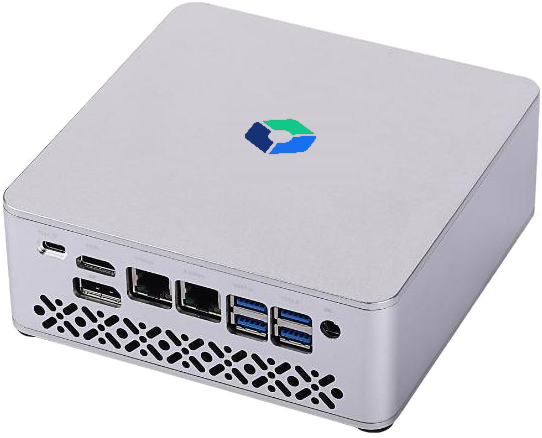
An edge AI computer for a desk, a training lab or a production line. A pre-installed model manager starts local LLMs with one click and connects coding agents. It also connects to robots and sensors, or serves as an on-site node for K100.
Images are for reference only. Actual product may vary.
Central compute for a department or a school. It runs a 27B-parameter LLM locally for knowledge bases and everyday agents.
More GPU memory, plus local image generation. For organizations that create illustrations, posters and marketing visuals on site.
Called for complex tasks with authorization; quotas and logs managed centrally
Local LLM, knowledge base, unified model gateway, industry agents
Real-time inference, video analytics and equipment control on site
Cameras, sensors, robots, lab equipment
The unified model gateway picks a model based on the task, the data type and your access policy. You decide which tasks run only on local models, which tasks may call the cloud, and which models and quotas are available.
Internal documents, business data and sensitive tasks can stay on local models only.
Complex reasoning tasks can call cloud models with authorization. Not every task needs the same model.
Set access by person, scenario and data scope, so not everyone can see everything.
Model choice, token usage and activity are logged in one place to support daily operations.
No. Tasks with internal documents can use local models only. Your access and routing policies decide whether a task may call a cloud model.
Yes, and we recommend it. Pick one department's frequent task, prove it with real documents and real users, then expand after acceptance.
We can assess this. The unified model gateway offers one model interface. Which systems to connect, and how, is agreed during the project discussion.
Use K100 for knowledge bases and agents shared by many people. Use K50 Edge for individual development, labs and real-time processing on production sites. You can combine them: K100 as central compute, K50 Edge as on-site nodes.
It can be one department's frequent task, a set of internal documents, an R&D team or a production site. We will suggest the right mix of devices, models and agents.