Sensitive documents stay on campus
School curricula, policy documents and internal materials can be processed by local models, without changing your data boundaries.
Local compute 中文ENTalk to us
Local compute, cloud models and the Zengcheng Education Agent, delivered as one platform. Sensitive data stays on campus, and stronger cloud models are available with authorization. Teachers can use it. The school stays in control.
Buying models, knowledge bases and apps separately leaves scattered entry points, hard-to-manage permissions and unclear data boundaries. Zengcheng AI delivers all three layers in one solution.
School curricula, policy documents and internal materials can be processed by local models, without changing your data boundaries.
Local computeEveryday tasks use local models first. Complex reasoning calls cloud models with authorization, with one entry point, one quota and one usage log.
Model gatewayReady-made capabilities for lesson prep, document handling, knowledge Q&A and collaboration. Teachers start from real tasks, not from learning prompts.
Education agentWe start from real roles and existing materials, and build one scenario you can verify.
Put school curricula, lesson plans, question banks and activity materials into the school's own knowledge base. Teachers start with lesson prep, adapting resources and finding materials.
Turn this school curriculum material into a 45-minute activity lesson.

A first draft is ready, organized by learning goals, activity steps and assessment. The 8 school documents it cites are marked for further editing.
K100 Lite and K100 Pro have the same teaching features. They differ only in local image generation. Labs need edge compute that connects to equipment: choose K50 Edge.
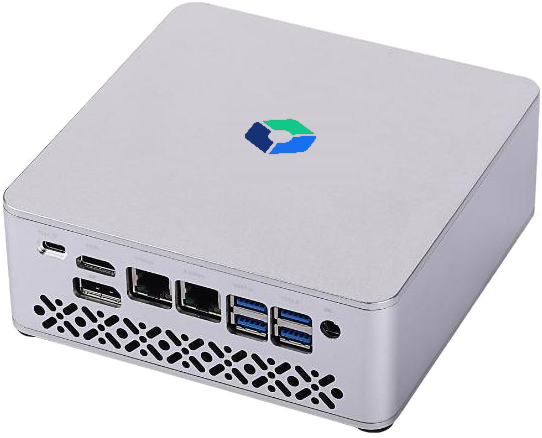
An edge AI computer for a desk, a training lab or a production line. A pre-installed model manager starts local LLMs with one click and connects coding agents. It also connects to robots and sensors, or serves as an on-site node for K100.
Images are for reference only. Actual product may vary.
Central compute for a department or a school. It runs a 27B-parameter LLM locally for knowledge bases and everyday agents.
More GPU memory, plus local image generation. For organizations that create illustrations, posters and marketing visuals on site.
Called for complex tasks with authorization; quotas and logs managed centrally
Local LLM, knowledge base, unified model gateway, industry agents
Real-time inference, video analytics and equipment control on site
Cameras, sensors, robots, lab equipment
Solve one clear problem, prove it with real use, then expand to more teachers, departments or campuses.
Choose a frequent task from lesson prep, admin Q&A, document handling or a lab course. Agree on the pilot scope and how to judge success.
Install K100 or K50 Edge and configure it for the school's network, accounts and security requirements.
Organize the first school documents, set permissions, and turn workflows into agents teachers can use right away.
Real users complete real tasks. We tune answers, permissions and model choices from their feedback, then expand step by step.
System maintenance, model updates, knowledge updates and agent improvements keep the platform growing with the school.
No. Tasks with sensitive school data can use local models only. The school's access and routing policies decide whether a task may call a cloud model.
Yes. First we agree on the scope of materials, who keeps them up to date and who can access them. Then we build the school knowledge base. Answers keep their sources, so teachers can check them.
Both have the same teaching features: chat, lesson prep, grading, test assembly, slides and document understanding. They differ only in local image generation. Choose K100 Pro to generate teaching illustrations, posters and display materials on the device. Otherwise K100 Lite is enough. The final choice depends on your models and scenarios.
Mainly in training labs and research labs. Students run models locally, do computer vision experiments, and connect robots and lab equipment through industrial interfaces. With K100, K50 Edge is a real-time edge node on campus, and data stays on campus.
It can be a lesson-prep task, a set of school documents, a training lab, or a school-wide AI platform you are planning. We will suggest the right mix of devices, models and agents.